I am always keen to discover new ways that technology can help improve my time management and productivity as these are critical to my business success.
As we are all aware, mobility has changed our everyday lives and we are “permanently on”. Smartphones and other mobile devices have taken over and ultimately altered the way we communicate – personal and business-wise – making it essential to look to apps that achieve increased productivity and better time management.
And as I am an avid user of my iPhone and Pad for work, I can attest that apps can make a big difference. And through the years of using a variety of apps, there are things I look for in a powerful app:
• Versatility – being available on all my devices, especially mobile e.g. Evernote, Skype, Podcasts, mSecure
• Integration – apps that work with other apps e.g. I am using Trello, Evernote and Dropbox as my primary data storage and task management apps. I am looking for other apps that will work with them e.g. Penultimate, CloudMagic, Keynote, etc.
• Service – apps that provide a real service by accumulating and/or customisinginformation – TripIt, Oz Weather, mSecure
• Portability – apps that allow me to carry and wide range of resources with me in a convenient format reducing clutter and volume e.g. Kindle, Podcasts, Audible, Evernote, Newstand
Based on this criteria, my top productivity apps are:
• Evernote – most amazing tool for storing and organising all your information no matter what format you need – Office, PDF, audio, video, webpages, text, voice, etc.
I use it to store everything except my main Office files (Word, Excel, PowerPoint) for which I still use conventional file storage mechanisms. All my resource materials and information is stored in Evernote. The best thing is that it is available on all my devices: desktop, iPad, iPhone and web – seriously good. I have the premium business version as it facilitates better communication with my Team.
• Trello – Provides Visual Task Management and Collaboration for me and the Team, a great tool that I use to manage all my tasks. Free for the basic version.
• CloudMagic – An email app for use on my iOS devices. A simple logic and flow, and it integrates seamlessly with Evernote and Trello. Free as well!
• Docs 2 Go & DropBox – apps for mobile data storage and file access. They enable me to easily transfer files between my desktop and my iPad. Invaluable.
• Pages, Keynote and Numbers – Apple’s in-house apps for word processing, spreadsheets and presentations on your iOS device. Makes it easier to access documents and presentations with you wherever you go.
• Penultimate – It allows me to write on my iPad with a stylus. Integrates with Evernote.
• TripIt – If you travel you must use this! TripIt automatically creates and coordinates all my travel details into online itineraries and then monitors then for changes! It links to Calendar apps seamlessly loading my travel plans into my calendar.
• Oz Weather – A great weather app. Very handy.
• Kindle (and IBook) – Apps for business books on the run.
• Podcasts – I use it to download great topics for learning on the go. I listen to them in the car. I have also just started using Audible for listening to books (jury is still out on this!).
• Newstand – I read “the Australian” newspaper and subscribe to my favourite magazines (like Top Gear) and can view them on my iPad. Very handy when I travel.
• Skype and VSee – For communication – free mobile video conference calls. App versions are great.
• mSecure – Password storage – a must have – a great app that is available and syncs across all your devices storing my Usernames and passwords.
• LinkedIn – Probably the only social media app that I like. I prefer the iPad version to the desktop version.
• Hootsuite – Social media posts made easy. iOS version is full-featured and easy to use.
• Calendar and CRM apps – Make sure your calendar and/or CRM have great app versions that enable you to seamlessly operate on a mobile business. I use the Apple Calendar app and Zoho.
There are a range of other quality apps that I use that are specific to my industry, occupation and interests. You should know the apps that are relevant to you and your business. And there are many versions of the apps above with similar functionality (or better) – what are your top productivity apps? Why?
Numerous sleep experts highlight the benefits of improved alertness and concentration following a 20-30 minute power nap. My challenge has always been that I seem to wake up after the nap – drowsy and anything but alert. Apparently, this is because I drop off into “deep sleep” rather than staying in a “light sleep” phase. This causes me to wake with Sleep Inertia.
I’ve found a great app to help with my naps – not surprisingly it’s called Sleep Cycle Power Nap and costs $2.49.
This smart app uses the accelerometer in your smart phone to monitor your sleep pattern and wakes you while you’re still in the light sleep mode – stopping you from dropping into deep sleep. You simply put your phone in your pocket (or I place it on the chair, bed, lounge, etc in contact with my body). I’ve found that it really works and use it regularly.
It has 3 modes:
• Power Nap – this will let you sleep for a max of 20 minutes and will wake you if you start to drop into deep sleep. Perfect for re-charging the battery.
• Recovery Nap – this mode lets you sleep for up to 45 mins but won’t let you drop into deep sleep. Great to boost energy levels.
• Full Sleep Cycle – this enables you to sleep for a full REM-Deep Sleep cycle (usually around 90 minutes). The alarm will gently wake you after a full cycle or within 2 hours, when you’re returned to light sleep. This means that you will wake refreshed.
If you want to maintain your performance, then power napping can be one of the tools in your repertoire and this app is a great tool to help optimise the outcomes.
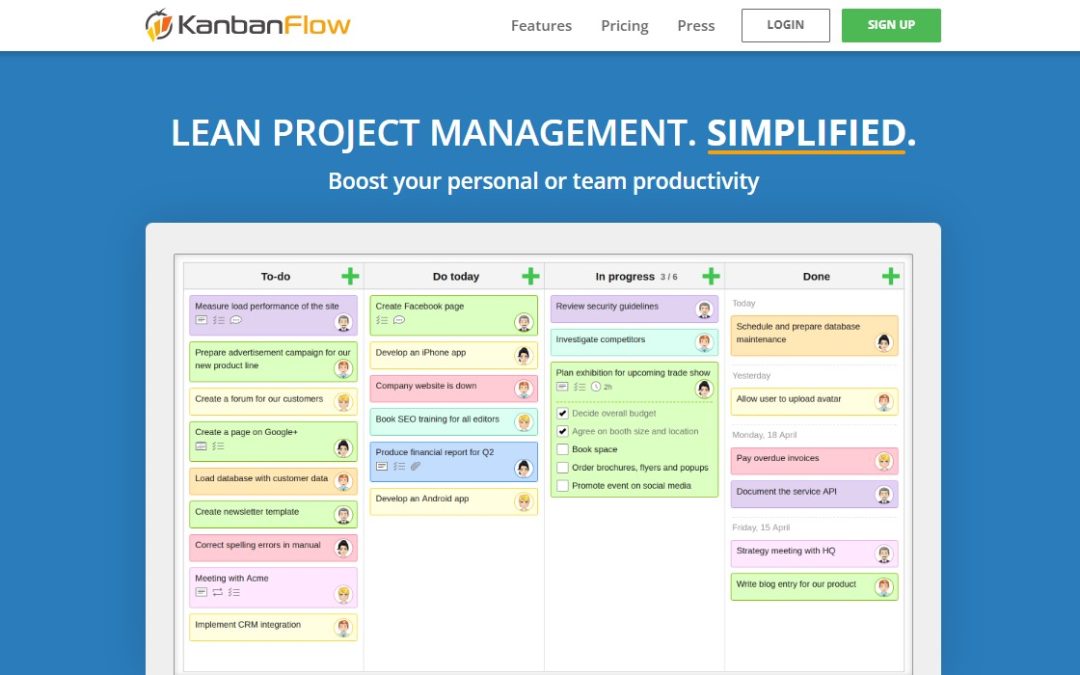
If you find yourself overwhelmed with all of the stuff you need to do, here’s a great productivity tool I found on the web that can help you get organized easily.
This tool is called the KanBan Flow tool which you can find onwww.kanbanflow.com. It is web-based and also has a version that you can download to your iPhone, iPad or Android devices so it’s with you wherever you go.
The KanBan Flow tool is a web-based board that gives you an excellent overview of your current work situation. It is divided into four columns – To-do, Do today, In progress and Done so you can easily monitor which things you worked on, you should be working on and what’s coming up. You can also have other people linked into your KanBan board.
Aside from the fact that it’s a productivity tool, what I like about this is that it’s visual, you can use color to mark and organize things, and simply drag and drop things to where you want them to be.
Learn more about this tool with my personal review. watch the video.
The flipside of “success” is “failure” and it’s the latter that every business owner and manager strive hard to avoid. By definition, the term “business failure” refers to the cessation of a company’s operations following its inability to generate enough revenue to cover expenses without adequate reserves.
In the recent times, there are many examples of strong businesses that have failed to adjust to the changing markets and economic times or to take advantage of opportunities – and this has ultimately led to their downfall.
Based on my 26 years experience working closely with business owners, here are my 9 key tips to avoiding business failure:
1. always ensure that you target your marketing.
Too many businesses have an undifferentiated product/service offering and fail to understand who their target customer is and what they require. Don’t be undifferentiated, make sure you’re speaking the right language and using the right channels and/or media in targeting your main group of consumers. Focus on delivering exceptional value. ACTION:Develop a structured Marketing Plan for your business and revise it regularly.
2. always plan ahead.
Talk about what you want to do next and where you’d want your business to go by preparing strategies that will help you focus on your business goals and objectives and to make sure that appropriate and sufficient resources are in place. Be rigorous in your planning and hold yourself and your Team accountable. ACTION:Develop a 5-year Strategic Plan supported by Annual Plans. Have 90 Days Actions. Cascade your plans so that everyone in your business is part of a plan.
3. have great business models.
It is a fact that most businesses fail because of poor business models – a business model describes you will engage your target market to profitably generate revenue. To avoid this, make sure that you have great and well-thought pricing models and economic cost models that will help your business focus more on creating, delivering and capturing value needed by your customers. ACTION:Understand your Business Model – there are some great tools to do this.
4. have effective processes.
All businesses are driven by processes. However, few businesses have well documented processes. Many businesses fail to have any continuous improvement processes and have a well entrenched view that they are already efficient. The reality is far from this and many businesses can improve productivity by up to 30%. The challenge is to avoid waste in: time, resources, opportunities, materials, etc. caused by inefficiency – this results in higher than necessary costs and lower margins. ACTION:Apply simple Process Improvement Tools, like 7 Wastes to your business on a regular basis. Never stop searching for improvement.
5. engage your team.
As a leader, you should be a good example to your team. Teach them how to own issues, take responsibility, be accountable and model proper engagement, not only with their customers and clients, but also with each other. An effective team will overcome most business obstacles and enable your business to seize opportunity, when required. ACTION:Engage your Team by improving communication and feedback.
6. have great sales processes.
Sales is the engine that drives your business. Most businesses that fail do not have effective sales processes in place. So with that said, make sure you have great processes that your salespeople can follow. ACTION:Clearly define your Sales Pipeline and develop a Sales Model that delivers.
7. ensure you have adequate cash buffers.
“Cash is fact – Profit is opinion!” This great quote from Andrew Russo (Master Accountant) gets straight to the heart of the matter. Ensure you build adequate cash reserves in your business to ride out changing markets and economic conditions. Cash reserves also allow you fantastic flexibility when looking at opportunities. ACTION:Develop a plan for how you can build cash reserves in your business. Engage your Coach or Accountant in this process.
8. avoide uncontrolled growth.
Uncontrolled growth is often a pre-cursor to business failure. When business growth is “out of control” often cash flow is uncontrolled. Rising sales are barely enough to cover rising costs and cash is at a premium. Cash flow, staff, customers and production are all stretched often to breaking point. Avoid this by “taking your foot off the accelerator” – be more discerning in taking on clients – engage strategies that will slow demand (like lift your prices) – say “No” to opportunities that aren’t in your sweetspot – and introduce tighter financial controls and KPI’s. ACTION:Monitor key drivers in your business and ensure that you have the capability to meet demand. Develop strategies to maintain control.
9. take early action.
Too many businesses fail to “take effective action” until it is too late. Act early and avoid the Receivers! Set up effective monitoring systems. Plan for different scenarios (revenue, cost. Market conditions, competition, etc) and define “trigger points” – bank balance, sales$, profit %, market KPIs, etc – that will cause you to evaluate your options well in advance. These options should include plans for how you will address the challenge – reduce staff numbers, cut costs, close non-performing divisions/products, etc. Make these decisions now rather than trying to make them when under pressure. aCTION:Develop plans to address particular scenarios with effective trigger points.
Focus on ensuring that you have all 9 elements covered and you will do more than stave off failure you will be on the road to success.
What is the element that has the highest priority for you? Pick one and start working on it now.
As part of my role as a Coach, I tend to deliver a range of tailored training programs for my clients. This usually involves a laptop computer, a presenter remote, a data projector and laptop speakers.
However, since purchasing an iPad over 2 years ago, I have found that I no longer have much use for a laptop – in fact, I have just purchased my first desktop computer in over 15 years – an iMac (and I love it!).
The catalyst for this was working out that I can use my iPad 2 to deliver my presentations with ease. So how does it work? What gear do I need?
What Equipment Makes it Work?
In addition to a presentation device, like a data projector or TV screen, you will need the following:
iPad – you will need an iPad 2 or iPad 3 as they allow you to share whatever is on your screen with your audience. This is useful when you want to show a YouTube clip or use custom software live. You can use an iPad 1 but it will only allow you to show a Keynote (PowerPoint) presentation.
You will need your iPad loaded with the Keynote App. Keynote is Apple’s answer to PowerPoint. You can download this from the App Store.
iPhone – I have an iPhone 4GS and use it as my remote to drive the presentation on my iPad. You will need the Keynote Remote app (it’s free) otherwise you will have to manually navigate through your presentation using the iPad screen. The Keynote Remote app allows you to preview the next slide or to view your notes on a current slide on your iPhone.
Adapter Leads – Apple sells a range of adapters that will enable you to link your iPad to a presentation device eg. data projector, large screen TV, computer monitor, etc. I carry VGA and HMDI adapters as these seem to cover most of the situations that I encounter.
Bluetooth Speakers (optional) – if you want to have sound as part of your presentation for example: for listening to a YouTube video, playing “mood” music, audio files, etc, then you will need external speakers. I have a set fromJambox that are excellent – great sound good volume for a small to medium room – bluetooth connectivity so no cables and great battery life. There are plenty of these devices on the market so find one that suits your needs and budget.
For larger venues, I have been able to plug into their in-house audio using the headphone jack on the iPad.
Power Adapter – you will need to manage your battery life on the iPad (we will discuss this more in detail below) so make sure you have your power adapter with you. I have recently purchased a 2-in-1 adapter from Sprout that will simultaneously charge my iPad and my iPhone, making it ideal for travelling and presentations.
Extenstion Keyboard (optional) – if you are planning to use the keyboard for live demonstrations of software or systems, you might find it beneficial to invest in an extension keyboard or numeric pad. There are numerous models to choose from including an Apple Wireless Keyboard. I use a Logitech model that has a great bluetooth QWERTY keyboard and also doubles as cover for iPad when travelling.
Making It Happen
Once you have all the gear, then you can set it up for your presentation as follows:
STEP 1: Import your presentation from your Desktop to the iPad – use either PowerPoint or Keynote or Google Docs to develop it. Import via email, iTunes or 3rd party programs like Docs-2-Go (my choice). Make sure that other presentation media are available as well – music, video, etc.
STEP 2: Load the presentation using the Keynote App on your iPad. Check that formatting changes during importation haven’t changed the look of your presentation.
STEP 3: Using the appropriate adapter link your iPad to the data projector or TV. Test and check that all systems are go.
STEP 4: Link the speakers via bluetooth or headphone adapter and test.
STEP 5: Use the Keynote Remote app to link your iPhone and iPad presentation. Test and check. Take the time to practice using the iPhone Remote and your iPad as the remote is sensitive and accidental touches on the screen can cause you to move backwards and forwards through your presentation.
Optimising Your iPad Battery
I found that the major limitation on the day was the battery life of my iPad and so if you have a big presentation to do (more than about 2 hours), you will need to use some battery management strategies. This is a real challenge as you cannot charge the battery and use the adapter cords as they all use the same socket.
Using the power strategies, below, I recently ran a series of full-day workshops using the tools outlined above.
1. Use “Airplane mode” on the iPad to shut down all excess power. Wifi, Bluetooth and Wireless internet connections will chew up a heap of power quickly. To use Keynote Remote (iPhone) and wireless speakers you will need to turn Bluetooth “ON” in the “Settings” app on your iPad.
2. Reduce the brightness of your iPad screen. You can adjust this in “Settings” or use the on-screen slide control. This will significantly reduce your power consumption.
3. Recharge the iPad during breaks using the power adaptor.
Make Use Of Great Technology
I find that by focusing on making the best use of the technology that I have at my disposal, I am able to: travel lighter, improve my personal productivity and get better outcomes for me and my clients. Imagine if you can use your iPad (or Android tablet) in concert with your smartphone and “the Cloud” to deliver all your needs while you travel.
I still bump into people carrying an iPhone, iPad and Laptop with them when they travel – surely at least one of these devices is redundant!
For me, the capability to deliver workshops and presentations on my iPad means that my laptop has become redundant.
What is the technology mix that is working best for you?
I recently posted about an interesting ad campaign from Canada using Porsches in a wealthy suburb in Toronto. Let’s expand on this concept of really understanding your target market and personalising your approach to them.
In the video, the advertising agency Lowe Roche in Toronto Canada thought of a way to make advertising more direct and more personal for client – Pfaff Porsche. They drove the Porsche to a neighborhood of affluent families in Toronto (which was their target market), parked the Porsche in driveways and took photos.
After the pictures were taken, the team from the advertising agency produced tailored marketing pieces for each address using mobile printers. They then distributed the print outs and the residents of the neighborhood received a personalized direct mail piece.
From this creative and very unique campaign, 32% of people responded to a website where they booked a test drive. For Pfaff Porsche, this ad campaign was very successful.
But this type of campaign isn’t completely new. In fact, an advertising agency for an auto company in the Netherlands has also utilised this type of campaign and has successfully tailored their marketing strategy to their customers.
They started using street view images about a year ago in their direct mails and the response has averaged about 63% leading to a 13% increase in sales from a single direct mail. They sent 1000 direct mails and sold 130 brand new cars in one dealership. This is a sensational response!
Now, with this type of personal and direct campaign so successful, how can we expand this beyond cars? How can we apply the same principles to other products and services? Some concepts are:
For fashion, the tailored marketing strategy would be to Photoshop different clothes onto client photos. Companies could make this work by allowing people subscribe to a service where they view themselves in different clothes and accessories. The business can also send them “an outfit” once per month. You could also do something similar for sporting apparel, ski wear, sunglasses, etc?
For Real Estate, the personal approach would be presenting views of the customer and his family in their new home. Or even having a “Sold” sign superimposed over the street view of their house.
For Roofing businesses, the direct strategy would be showing customers what their house would look like with a different colour and style of roof.
But if you can’t use this type of marketing strategy in promotion, maybe you can use it to personalise a product.
Bundaberg Brewed Drinks has done this with their “personalised label” offer where you can create your own product labels using your own photos. It is also available through their iPhone apps.
What can you do to tailor your marketing to a clearly defined target market?
We are in a highly competitive world where consumers are constantly bombarded with information and advertising. You need to make your promotions cut through the clutter.
Maybe using a highly tailored approach to directly target or link your brand to the consumer is an option you should be considering?

 • Evernote – most amazing tool for storing and organising all your information no matter what format you need – Office, PDF, audio, video, webpages, text, voice, etc.
 • Trello – Provides Visual Task Management and Collaboration for me and the Team, a great tool that I use to manage all my tasks. Free for the basic version.
 • CloudMagic – An email app for use on my iOS devices. A simple logic and flow, and it integrates seamlessly with Evernote and Trello. Free as well!
 • Docs 2 Go & DropBox – apps for mobile data storage and file access. They enable me to easily transfer files between my desktop and my iPad. Invaluable.
 • Pages, Keynote and Numbers – Apple’s in-house apps for word processing, spreadsheets and presentations on your iOS device. Makes it easier to access documents and presentations with you wherever you go.
 • Penultimate – It allows me to write on my iPad with a stylus. Integrates with Evernote.
 • TripIt – If you travel you must use this! TripIt automatically creates and coordinates all my travel details into online itineraries and then monitors then for changes! It links to Calendar apps seamlessly loading my travel plans into my calendar.
 • Oz Weather – A great weather app. Very handy.
 • Kindle (and IBook) – Apps for business books on the run.
 • Podcasts – I use it to download great topics for learning on the go. I listen to them in the car. I have also just started using Audible for listening to books (jury is still out on this!).
 • Newstand – I read “the Australian” newspaper and subscribe to my favourite magazines (like Top Gear) and can view them on my iPad. Very handy when I travel.
 • Skype and VSee – For communication – free mobile video conference calls. App versions are great.
 • mSecure – Password storage – a must have – a great app that is available and syncs across all your devices storing my Usernames and passwords.
 • LinkedIn – Probably the only social media app that I like. I prefer the iPad version to the desktop version.
 • Hootsuite – Social media posts made easy. iOS version is full-featured and easy to use.
 • Calendar and CRM apps – Make sure your calendar and/or CRM have great app versions that enable you to seamlessly operate on a mobile business. I use the Apple Calendar app and Zoho.
 It has 3 modes:
 You can get the